
Sora 2 Pricing Guide 2026: Plans, Costs, and What You Actually Get
A complete breakdown of Sora 2 pricing plans in 2026, including Pro and Plus tiers, credit costs per video, and how to calculate your monthly spend for AI video generation.
Sora 2 has quickly become one of the most talked-about tools in AI video generation, but understanding its actual pricing can be confusing. With multiple plan tiers, credit-based generation limits, and different resolution options, the real cost depends heavily on how you use the tool. This guide breaks down every plan, every cost, and helps you estimate what you will actually spend.
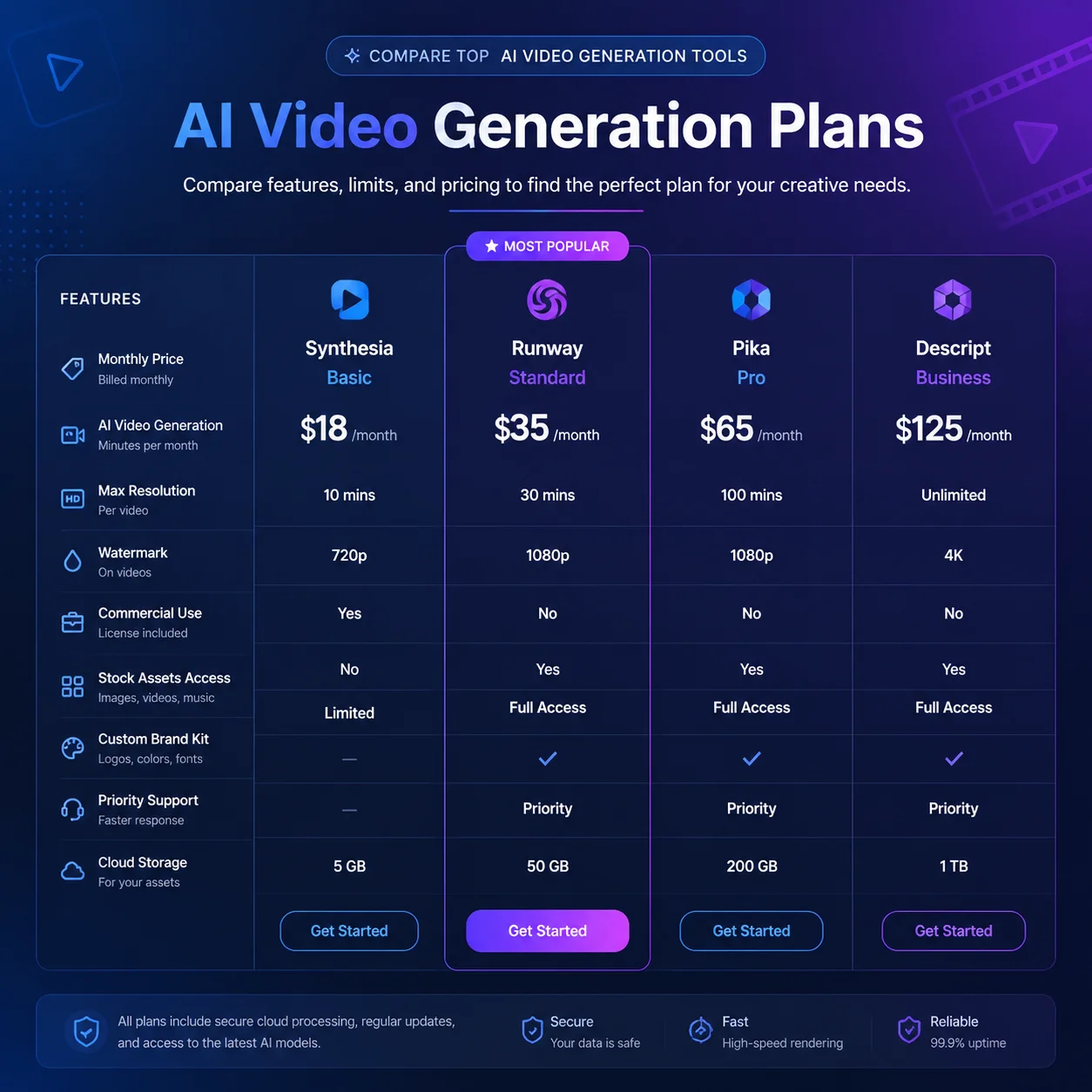
Sora 2 plan overview
OpenAI currently offers two main subscription tiers for Sora 2. The Plus plan is designed for individual creators and small teams who need occasional access. The Pro plan targets professional users, agencies, and production teams generating video content at higher volumes. Both plans include access to the core Sora 2 model, but differ significantly in monthly credit allocation, resolution caps, and priority processing.
The Plus plan costs approximately twenty dollars per month and includes a baseline number of generation credits that refresh monthly. Each generation request consumes credits based on the resolution, duration, and complexity of the video. At 480p or 720p resolution, a Plus subscriber can typically generate around fifty short videos per month before hitting the cap. Additional credits can be purchased, but the per-credit cost is higher on the Plus tier than on Pro.
Pro plan pricing and benefits
The Pro plan runs approximately two hundred dollars per month and is structured for users who treat AI video generation as a primary production pipeline. Pro subscribers receive a significantly larger credit pool, priority access during high-demand periods, and higher resolution generation options up to 1080p. For teams producing weekly ad variants, product demos, or social media content, the Pro plan usually delivers better per-video economics than repeatedly purchasing top-up credits on Plus.
One underappreciated benefit of the Pro tier is the relaxed watermarking policy. Pro users can generate videos without mandatory Sora branding, which matters for commercial campaigns and white-label production. Pro also includes faster queue times, which can be the difference between shipping five variants in an afternoon versus waiting overnight for renders to complete.
What drives your actual cost per video
The sticker price is only part of the story. The actual cost per finished video depends on several factors that many users overlook. Video duration is the largest multiplier: a ten-second clip might cost two credits, while a sixty-second generation at high resolution can consume ten or more credits. Resolution choice also matters substantially. Generating at 1080p typically costs more credits than 720p, and 4K generation consumes credits at a significantly accelerated rate.
The number of retries per final video is another hidden cost driver. If you generate three candidate clips for every one you publish, your effective cost per deliverable triples. Teams that invest time in precise prompt engineering before hitting generate typically get more usable first results, which translates directly to lower per-video spend. A well-structured prompt with clear scene description, camera direction, and subject detail can reduce retry rates by half or more.
Credit economics for different use cases
A solo content creator making short social media clips might spend between forty and eighty dollars per month on Sora 2, including a Plus subscription plus occasional credit top-ups. A small marketing agency running multiple client accounts with weekly testing cadences might spend four to eight hundred dollars per month on the Pro tier plus additional credits. An enterprise team producing high-resolution commercial content at scale should budget one to three thousand dollars monthly, factoring in the full pipeline including prompt development, variant generation, and post-generation editing.
Compared to traditional video production, even the higher end of Sora 2 pricing delivers dramatic savings. A single half-day studio shoot with an actor, camera operator, and basic lighting can easily cost two thousand dollars and produce only a handful of usable clips. Sora 2 can generate dozens of variants from that same conceptual budget, each with different angles, hooks, and visual treatments.
Free tier and trial options
OpenAI typically offers a limited free tier or trial period for new Sora users. This allows testing the generation quality, resolution options, and workflow before committing to a paid plan. However, free-tier generations usually carry mandatory watermarks and are capped at lower resolutions or shorter durations. For serious evaluation, plan to spend at least one month on the Plus tier to properly test generation quality, speed, and how well the tool fits your specific production needs.
How Sora 2 pricing compares to alternatives
When comparing Sora 2 pricing to competing platforms like Kling AI, Runway, or Pika, the cost structure is broadly similar: subscription tiers plus usage-based credit consumption. Sora 2 tends to be priced at a premium relative to some competitors, but its generation quality, prompt adherence, and motion consistency often justify the difference for professional use cases. For teams that need reliable, high-quality output with minimal post-processing, the premium over cheaper alternatives frequently pays for itself in saved editing time.
The bottom line: Sora 2 pricing is competitive with traditional video production at basically every scale, but the biggest savings come from reducing the creative iteration cycle. Instead of waiting weeks for a reshoot, teams can generate, review, and regenerate in minutes. That speed advantage is the real economic value of AI video generation, and it is what makes Sora 2 worth the subscription cost for teams that treat creative production as an ongoing process rather than a one-off project.
How to apply this guide in makeads
Use this guide as a practical checkpoint for planning AI UGC videos, comparing creative angles, and deciding which parts of your workflow should be scripted, generated, reviewed, localized, and tested first.
The most useful next step is to translate the advice into one production brief: define the audience, the opening hook, the proof moment, the actor style, subtitle requirements, and the metric you will use to decide whether a video variant is worth scaling.
Related focus areas for this topic include Sora 2, AI Video Pricing, OpenAI, Video Generation. If you are building a campaign library, connect this guide with your pricing assumptions, platform policy checks, and localization plan before creating the final export.