
Google Ads AI Image Generator: Creating Visual Assets at Scale
Learn how to use Google Ads AI image generator to create campaign visuals quickly. Understand capabilities, limitations, best practices, and how AI-generated images fit into your advertising workflow.
Google has integrated AI image generation capabilities directly into its advertising platform, giving marketers a new tool for creating visual assets at scale. Understanding what this tool can and cannot do helps you incorporate it effectively into your creative workflow.
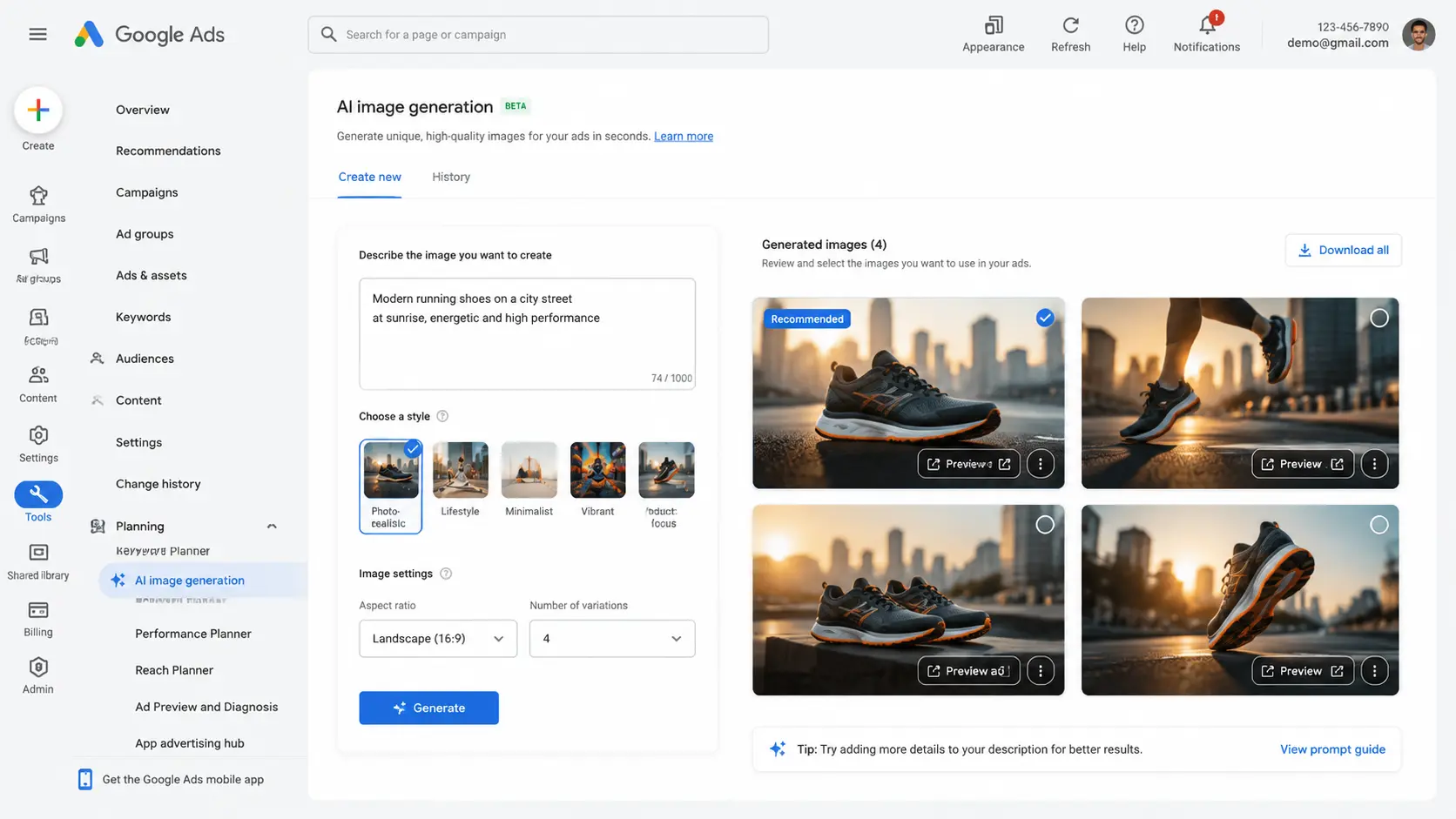
How Google Ads AI image generation works
The AI image generator is integrated into Google Ads campaign creation workflows. When setting up responsive display ads or performance max campaigns, you can generate images from text prompts instead of uploading pre-made assets. The tool produces multiple variations based on your description, which you can select, refine, or regenerate.
The technology uses Google's Imagen model family, optimized for creating marketing-safe imagery. It applies content policies automatically, filtering out prompts that could generate problematic content. This safety layer reduces brand risk but also limits creative flexibility compared to unrestricted AI image tools.
What the tool does well
Product photography simulations are a strength. You can generate images of products in lifestyle settings, different backgrounds, or contextual environments without actual photography. A skincare brand can show products in bathroom settings, a food brand can show meals on tables, and a tech brand can show devices in offices.
Background generation and modification works reliably. If you have product cutouts, the AI can place them in various contexts. This speeds up variant creation for testing different visual approaches without manual compositing work.
Limitations to understand
The tool cannot generate images of specific people, real products, or copyrighted content. You cannot upload a product photo and have the AI generate new angles or contexts for that specific product. The output is always a generated image, not a modification of your actual product photography.
Brand consistency is challenging. While you can specify colors and styles, achieving exact brand matches requires careful prompt engineering and often multiple iterations. For brands with strict visual guidelines, traditional design workflows may still be more efficient.
Best practices for prompt writing
Be specific about composition, style, and context. Instead of "running shoes," try "professional running shoes on a blurred outdoor running track, morning light, product photography style." The more detail you provide, the closer the output matches your intent.
Specify technical aspects like aspect ratio, color palette, and mood. AI image generation is sensitive to these parameters. Including them in prompts reduces the number of iterations needed to get acceptable results.
Integrating AI images into your workflow
Use AI generation for rapid concept testing and early-stage creative exploration. Generate multiple visual directions quickly, test which resonate with audiences, then invest in professional production for winners. This approach reduces risk by validating concepts before committing production budget.
For final campaign assets, AI-generated images work best for generic or contextual visuals where brand-specific precision matters less. Backgrounds, lifestyle settings, and supporting imagery are appropriate use cases. Hero product photography and brand-defining visuals still benefit from professional production.
Compliance and brand safety
Google's built-in content policies reduce brand risk, but do not eliminate it. Review all AI-generated images before use. Check for visual artifacts, unintended meanings, or elements that could be problematic in specific contexts. The AI cannot understand cultural sensitivities or brand-specific guidelines that a human reviewer would catch.
Document your use of AI-generated imagery where required by platform policies or internal guidelines. Transparency about AI use in advertising is evolving, and requirements vary by jurisdiction and platform. Stay current with policy updates to ensure compliance.
Future developments
Google continues developing its AI creative tools. Expect improvements in image quality, brand customization, and integration with other advertising features. The current capabilities represent an early stage of what will likely become standard functionality in digital advertising workflows.
Teams that learn to use AI image generation effectively now will be well-positioned as the technology improves. Start experimenting with the tool in low-risk contexts to build familiarity before relying on it for critical campaigns.
How to apply this guide in makeads
Use this guide as a practical checkpoint for planning AI UGC videos, comparing creative angles, and deciding which parts of your workflow should be scripted, generated, reviewed, localized, and tested first.
The most useful next step is to translate the advice into one production brief: define the audience, the opening hook, the proof moment, the actor style, subtitle requirements, and the metric you will use to decide whether a video variant is worth scaling.
Related focus areas for this topic include Google Ads, AI Image Generation, Creative Tools, Digital Marketing. If you are building a campaign library, connect this guide with your pricing assumptions, platform policy checks, and localization plan before creating the final export.